Plain Lightning or bitcoin tip jar?
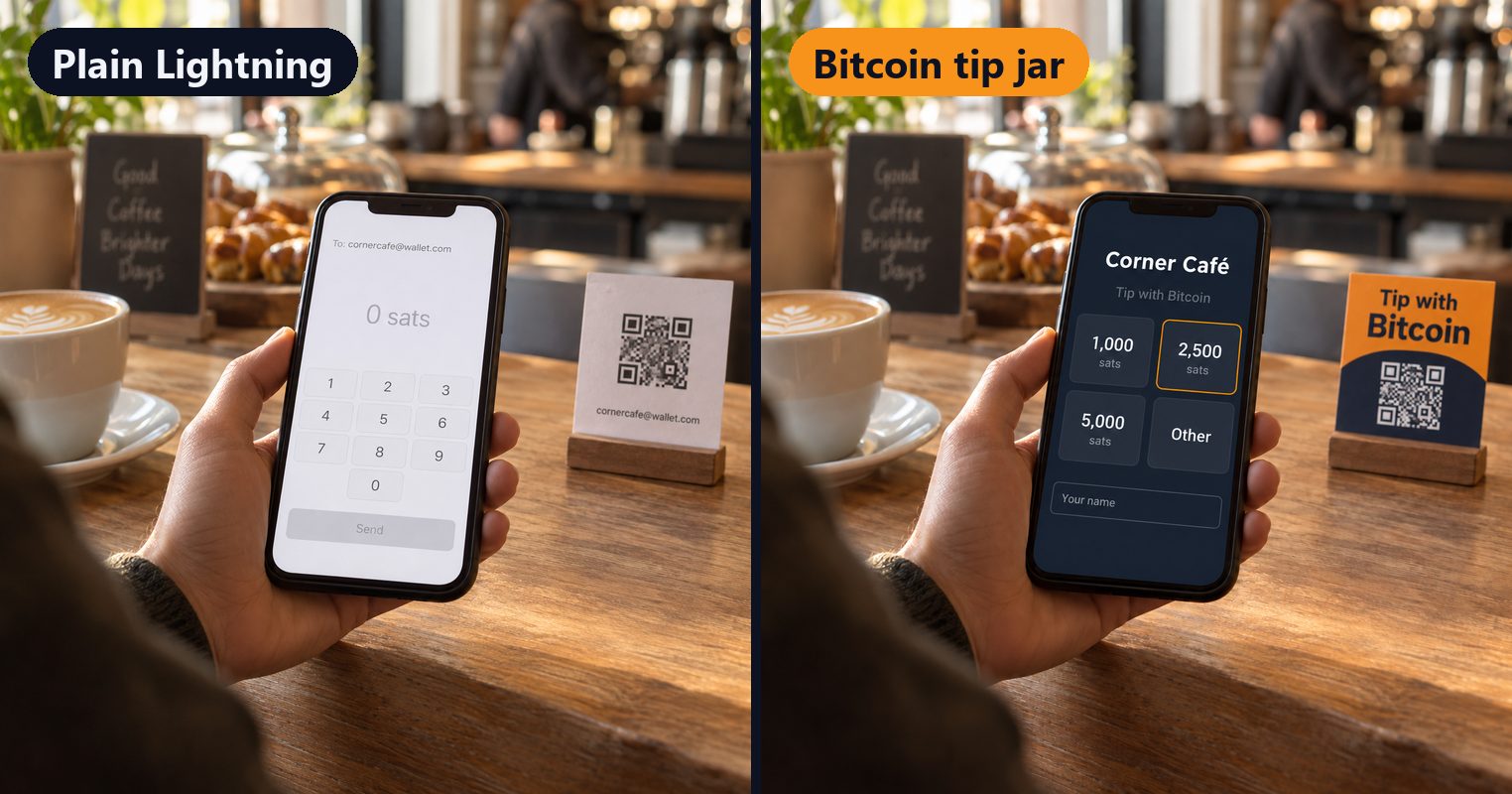
Sam is paying for a flat white. By the till there's a small card with a QR code and a line of text under it: the café's Lightning address. She scans it. Her wallet opens a send screen with the address in small grey type, an empty amount box and a keypad. Nothing on the screen says who she's paying, or what people usually leave. She types 2,000, deletes a zero, types it again, and sends. Behind the counter, nothing happens.
At the next café, the card by the till says Tip with Bitcoin. Sam scans it and her phone opens a page with the café's name at the top and four amounts underneath, each with its value in dollars. There's a box for her name. She types "Sam", taps 2,500 sats, and her wallet opens with the amount already filled in. She confirms, and the page says Paid ✓. The café's record says Sam, 2,500 sats.
Both cafés got paid. Only one of them made it easy, and only one of them knows who it was.
What a scanned Lightning address actually shows
A Lightning address looks like an email address, something like cornercafe@wallet.com. When a customer scans it, their wallet asks the café's wallet how to pay it and gets back the basics: the smallest and largest amount it will take, sometimes a line of description, and whether it accepts a short note.
Then the customer's wallet takes over, and every wallet does it differently. Most show the address and an empty amount box. Some convert to dollars as you type. Some offer a note field, which most people never notice. None of them suggest what's normal to leave. And the café sees a number arrive in its wallet, usually with no name on it.
The empty box costs the most. We wrote a whole article about it: why your bitcoin tip jar needs preset amounts. The short version: faced with a blank box and a price in sats they can't picture, a lot of people put the phone away.
What a tip jar adds
A tip jar is a page in front of your Lightning address. The money still goes straight from the customer's wallet to yours: the page asks your wallet for an invoice and shows it as a QR code, and nothing in between holds the sats. What changes is everything around the payment.
- Your name, and your logo if you want it. The customer knows who they're tipping.
- Preset amounts, with dollar values. One tap instead of a sum in their head.
- A name with the tip. Customers can add their name, and it arrives with the payment.
- "Paid ✓". The customer sees the tip land on their own screen, the moment it does.
- A record. Every tip your wallet confirmed, with names, to check or download.
- A link that outlives your wallet. Claim a short link like bitcointipjar.com/yourcafe and print that. Change wallets next year and you change one setting: every poster, sticker and bio link keeps working. A printed Lightning address only works for as long as you keep that wallet.
- A poster. Print-ready, with your amounts on it, so the sign by the till does some of the asking.
Names and "Paid ✓" need a wallet that supports them, and many of the popular ones do. See which wallets confirm payments and carry names.
When a bare address is fine
A jar isn't always worth it.
- Between friends. If everyone already knows who they're paying and what's normal, the address does the job.
- On Nostr. Zaps already carry names and show up on the post. You don't need a page in front of them.
- For a one-off. A single event where you won't reprint anything and don't mind not knowing who tipped.
If it's going by a till, on a stream or at the end of a video that people will find for years, that's where a jar earns its place.
Setting one up
Paste your Lightning address at bitcointipjar.com and you have a tip page, a QR code and a poster. There's no account, and the tips go to the wallet you already use. Claim a short link if you want the one that outlives your wallet.